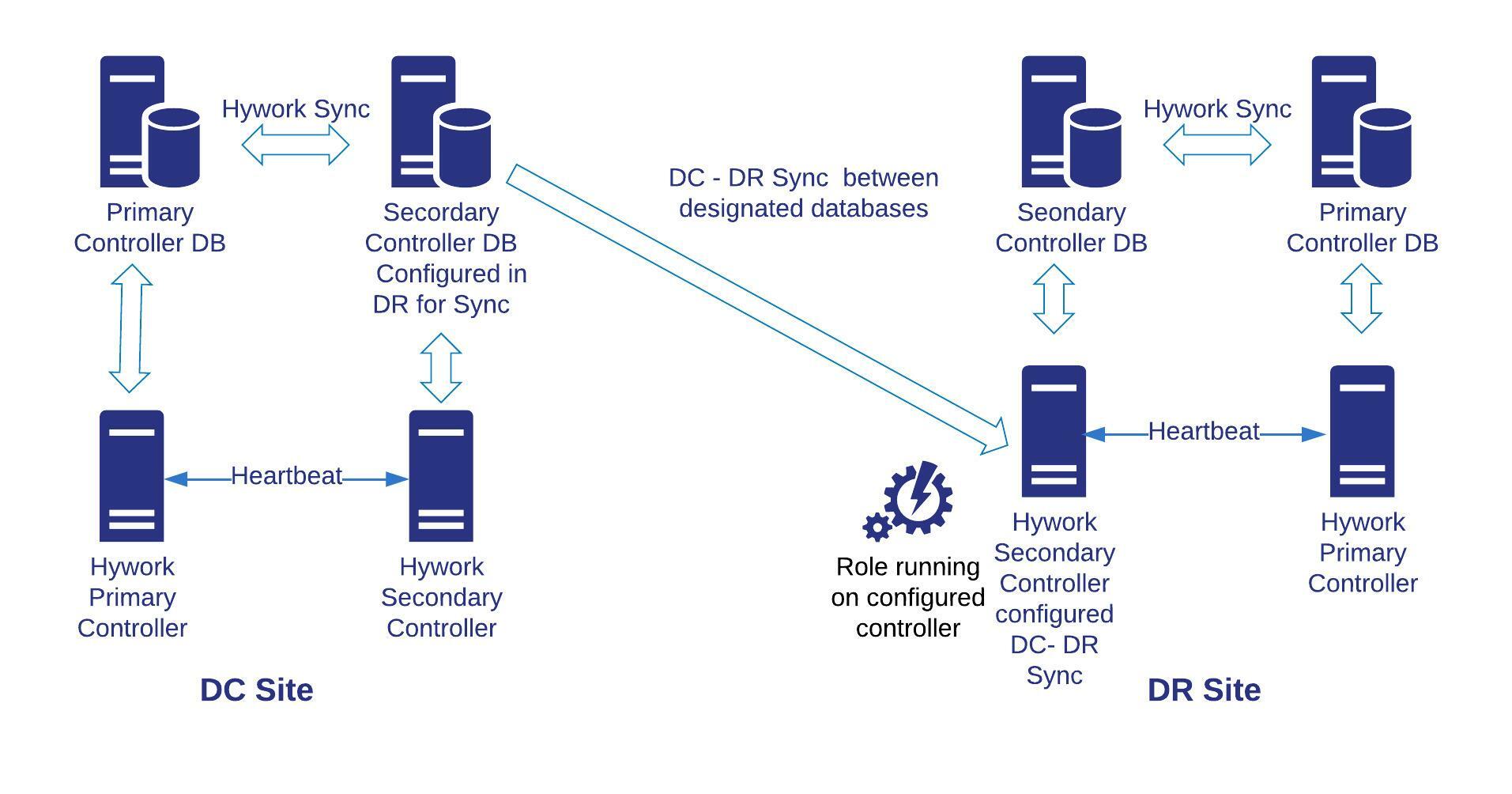
Data Center and Disaster Recovery (DC/DR) Management
DC/DR Migration
Definition
- DC/DR Migration refers to the process of moving data, applications, or infrastructure from one data center (DC) to another or to a disaster recovery (DR) site to ensure business continuity, enhance performance, or meet compliance requirements.
- It involves transferring workloads, configurations, and data while minimizing downtime and ensuring data integrity.
Why DC/DR Migrations Are Done
- Business Continuity: Ensures applications and data remain available during disasters (e.g., natural calamities, power outages).
- Cost Optimization: Relocates to a more cost-effective data center or cloud provider to reduce operational expenses.
- Performance Improvement: Moves to a geographically closer data center to reduce latency for end-users.
- Compliance: Meets regulatory requirements by hosting data in specific regions or secure facilities.
- Modernization: Upgrades to newer infrastructure or cloud-based environments for better scalability and efficiency.
How DC/DR Migrations Are Done
Planning:
- Assess current infrastructure, applications, and dependencies.
- Define migration goals (e.g., zero downtime, minimal data loss).
- Choose the target environment (e.g., another data center, cloud provider like AWS or Azure).
Data Replication:
- Replicate data to the target site using tools like rsync, AWS DataSync, or Azure Site Recovery.
- Ensure data consistency between source and target.
Application Migration:
- Use lift-and-shift (moving as-is), re-platforming (minor adjustments), or refactoring (rewriting for new environment).
- Test applications in the target environment before full migration.
Testing and Validation:
- Conduct dry runs to validate configurations and performance.
- Verify network connectivity, security settings, and application functionality.
Cutover
- Switch operations to the new site with minimal disruption.
- Use DNS updates or load balancers to redirect traffic.
Post-Migration:
- Monitor performance and resolve issues.
- Decommission old infrastructure if no longer needed.
Planning DR Drills
Purpose: Simulate disaster scenarios to test the effectiveness of the DR plan.
Steps:
- Schedule drills during low-impact periods.
- Define failure scenarios (e.g., server failure, network outage).
- Execute failover to the DR site and measure recovery time.
- Document results and update the DR plan based on findings.
Frequency: Conduct drills quarterly or biannually to ensure preparedness.
Real-World Examples
- A financial institution migrates its data center to AWS to comply with regional data residency laws, using AWS Database Migration Service for seamless data transfer.
- A retail company conducts a DR drill by simulating a power outage, failing over to a secondary data center using VMware Site Recovery Manager to ensure zero downtime for its e-commerce platform.
DC/DR Storage Synchronization
Definition
DC/DR Storage Synchronization is the process of continuously replicating and synchronizing data between a primary data center and a disaster recovery site to ensure data availability and consistency during failover.
- It ensures that the DR site has an up-to-date copy of critical data to support recovery operations.
Why DC/DR Storage Synchronization Is Done
- Data Availability: Ensures data is accessible at the DR site during a disaster.
- Minimized Data Loss: Reduces the risk of data loss by keeping primary and DR sites in sync.
- Faster Recovery: Enables quick failover to the DR site with minimal downtime.
- Compliance: Meets regulatory requirements for data redundancy and backup.
How DC/DR Storage Synchronization Is Done
Replication Methods:
- Synchronous Replication: Data is written to both primary and DR sites simultaneously, ensuring zero data loss but requiring high-bandwidth, low-latency connections.
- Asynchronous Replication: Data is written to the primary site first and then replicated to the DR site with a slight delay, suitable for geographically distant sites.
Tools and Technologies:
- Use storage solutions like ZFS, NetApp SnapMirror, or AWS S3 Cross-Region Replication for data synchronization.
- Implement block-level replication for databases or file-level replication for shared storage.
Monitoring and Validation:
- Monitor replication status using tools like Nagios or AWS CloudWatch.
- Validate data integrity with checksums or hash comparisons.
Failover and Failback:
- During a disaster, switch to the DR site using synchronized data.
- After recovery, synchronize changes back to the primary site (failback).
Planning DR Drills for Storage Synchronization
- Test synchronization by simulating data corruption or site failure.
- Verify that the DR site can serve synchronized data without errors.
- Measure Recovery Point Objective (RPO) and Recovery Time Objective (RTO) to ensure they meet business requirements.
Real-World Examples
- A healthcare provider uses Azure Blob Storage with Geo-Redundant Storage (GRS) to synchronously replicate patient records across regions, ensuring compliance with HIPAA regulations.
- An e-commerce company uses ZFS snapshots and replication to synchronize product inventory data between its primary data center and a DR site, enabling quick recovery during server failures.