1. ZFS Volume Configuration
What is ZFS?
ZFS (Zettabyte File System) is both a file system and a volume manager, originally developed by Sun Microsystems and now widely adopted in enterprise and open-source storage systems (like FreeNAS/TrueNAS). Unlike traditional file systems (ext4, NTFS), ZFS integrates file system and volume management in a single layer.
Key Features of ZFS
-
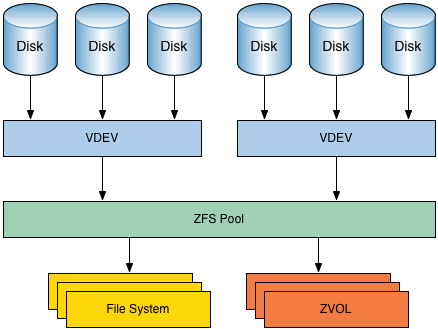
Pooled Storage
- Traditional systems use fixed volumes tied to specific disks.
- ZFS allows multiple physical disks to be grouped into a storage pool.
- From this pool, administrators can create flexible file systems or block devices as needed.
-
Snapshots and Clones
- A snapshot is a read-only point-in-time copy of the file system.
- A clone is a writable copy of a snapshot, useful for testing and development.
-
Self-Healing
- ZFS uses checksums to detect data corruption.
- If a bad block is detected, it automatically repairs it from redundant copies.
-
Advanced RAID (RAID-Z)
- ZFS introduces RAID-Z, which is more reliable than traditional RAID-5.
- It avoids the “write hole problem” (risk of data loss during power failure).
-
Compression and Deduplication
- Built-in compression saves storage space.
- Deduplication ensures identical data blocks are stored only once.
Example
An admin configures a ZFS pool on FreeNAS with 6 disks:
- Pool created as RAID-Z2 (tolerates up to 2 disk failures).
- Snapshots taken daily for backups.
- Deduplication enabled to optimize storage for virtual machine images.
This setup ensures reliability, scalability, and efficient storage usage.
WOW Tip
ZFS is designed to scale up to 256 quadrillion zettabytes of storage. While this is far beyond current hardware limits, it makes ZFS essentially future-proof.

2. IP-Based Storage Communication
What is it?
In SANs, not all organizations can afford expensive Fibre Channel infrastructure. IP-based storage communication allows block-level storage traffic to run over standard Ethernet networks, making SAN technology accessible to smaller businesses.
Theoretical Definition
Protocols like iSCSI (Internet Small Computer Systems Interface) encapsulate SCSI commands (used for disk operations) into IP packets. This allows servers to treat networked storage devices as if they were locally attached drives.
Other approaches include:
- FCoE (Fibre Channel over Ethernet): Fibre Channel traffic encapsulated over Ethernet.
- NVMe over Fabrics (NVMe-oF): Uses Ethernet, Fibre Channel, or InfiniBand to deliver ultra-fast access to NVMe drives.
Advantages of IP-Based SANs
-
Cost-Effective
- Uses existing Ethernet switches instead of Fibre Channel infrastructure.
-
Flexibility
- Easy to extend SANs across geographic locations using standard IP networks.
-
Simpler Management
- Network admins familiar with TCP/IP can manage iSCSI without learning Fibre Channel.
-
Integration with Virtualization
- Popular hypervisors (VMware, Hyper-V, KVM) support iSCSI storage.
Example
- A small company uses a 10 Gbps Ethernet network with FreeNAS configured for iSCSI.
- Their servers connect to iSCSI targets (logical storage units).
- Virtual machines hosted on VMware ESXi use this shared iSCSI storage for VM disks.
This provides SAN-like benefits without high Fibre Channel costs.
WOW Tip
iSCSI SANs helped democratize enterprise storage. Many cloud providers started with iSCSI-based backends before upgrading to NVMe fabrics for scale.
3. Object Storage Services
What is Object Storage?
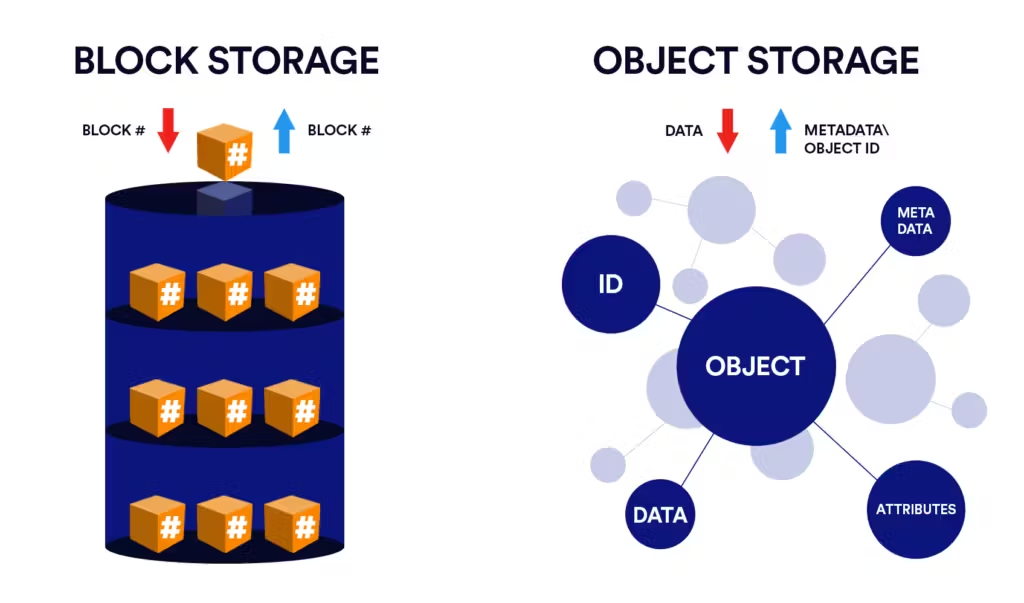
Unlike SAN (block storage) or NAS (file storage), Object Storage treats data as discrete units called objects. Each object contains:
- Data (the actual file, like an image or video).
- Metadata (details about the file, like creation date, permissions).
- Unique Identifier (an ID used to retrieve the object).

Theoretical Definition
Object storage is a flat storage system designed for massive scalability and unstructured data. Data is accessed via RESTful APIs (like Amazon S3 API) rather than traditional file system paths.
Advantages
-
Massive Scalability
- Can store petabytes or even exabytes of data.
- No traditional file hierarchy, making it more efficient for large datasets.
-
Durability
- Objects are usually replicated across multiple servers or regions.
-
Accessibility via APIs
- Applications interact with object storage via URLs and APIs instead of mounting drives.
-
Cost-Effectiveness for Unstructured Data
- Great for backups, archives, videos, images, logs, and cloud-native apps.
Examples
- Amazon S3: Used globally for cloud applications.
- Azure Blob Storage: Microsoft’s object storage service.
- MinIO: Open-source, S3-compatible object storage used for private clouds.
Real-World Use Case
Netflix uses Amazon S3 to store and deliver its massive video library. When you stream a show, the data is fetched as objects from distributed storage, ensuring high availability and low latency.
WOW Tip
Unlike block or file storage, object storage is location-independent — meaning your application doesn’t care where the data is physically stored. The unique object ID handles retrieval, making global-scale storage possible.
Summary
- ZFS provides enterprise-grade reliability with advanced features like snapshots, RAID-Z, and self-healing.
- IP-based storage (iSCSI, FCoE, NVMe-oF) brings SAN capabilities to Ethernet networks, making them cost-effective.
- Object Storage is built for the cloud era, handling massive unstructured datasets via APIs.
Together, these technologies complement SANs and modern data centers to provide scalable, reliable, and flexible storage solutions.